A sick pet doesn't wait for page two either.
Most pet owners pick a vet from the map pack near home — the same hyperlocal pattern as a dentist — except an emergency clinic or an exotics specialist can pull clients from well outside that radius. SeoMap grids the clinic's real catchment and colours every point by where it actually ranks, so you can see exactly which streets a competitor already owns and whether the clinic still shows up when someone searches urgently.
Built around what you actually do all day.
- 01
Two catchments in one practice: routine and emergency
Routine care ("vet", "pet vaccination") behaves like dental search — tight, hyperlocal, a boundary within a few kilometres. "Emergency vet" or "24 hour vet clinic" pulls from a much wider radius, because pet owners will drive further when it's urgent. Grid size and spacing (5×5 up to 15×15) are configurable enough to run both scans at the size each one actually needs.
- 02
Species and specialty keywords return different results
"Vet", "exotic vet" and "equine vet" can show completely different map packs at the same coordinate — a general practice and a specialist clinic aren't competing for the same search. Run a separate scan per keyword, or import Google Search Console data to pre-fill the actual queries pet owners used in the last 90 days.
- 03
Consolidating vet groups need branches kept apart
As independent practices increasingly join larger veterinary groups, each clinic is matched to its Google listing by CID/Place-ID rather than by name — so a newly-acquired branch, an existing location, and an unrelated clinic sharing a similar name never get confused in the data.
- 04
Seeing which suburb still needs a stronger emergency signal
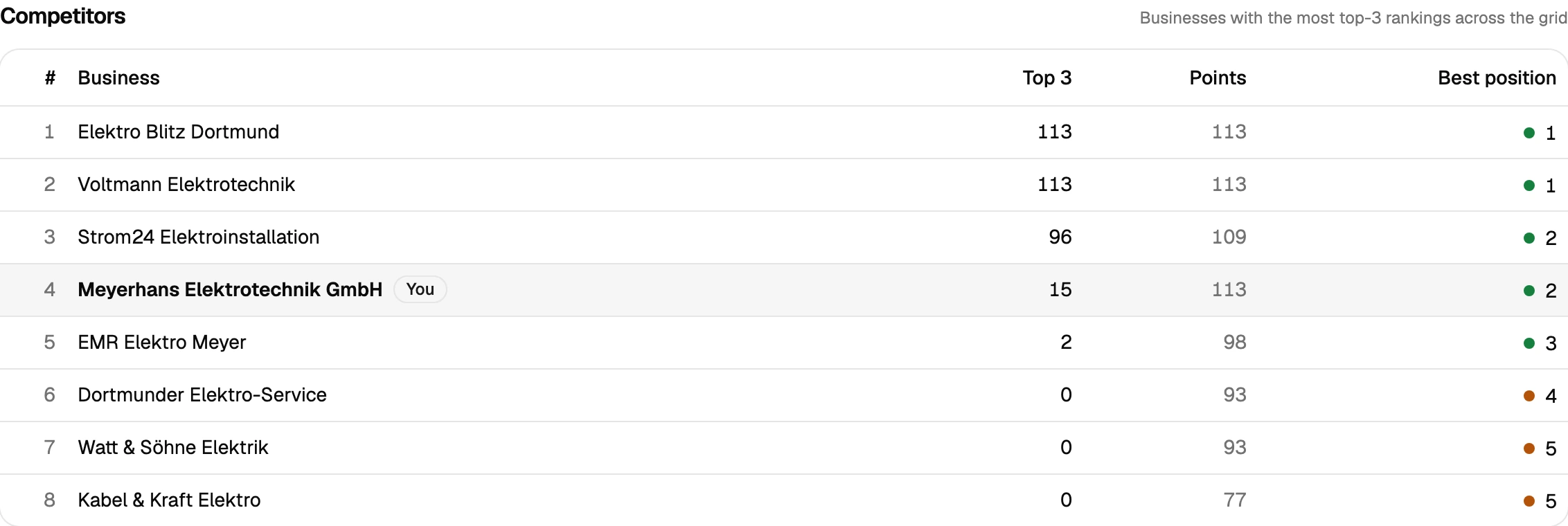
Competitor analysis ranks every clinic that shows up across the grid by how often it lands in the top 3. For a group deciding where to invest in 24-hour coverage or emergency-specific marketing, that's a direct read on which parts of the catchment are already covered by a strong incumbent.
- 05
Proof for a practice group's marketing budget
After a Google Business Profile update or a new emergency-care landing page, scan comparison lays the old and new grid side by side with the delta per point — improved, dropped, new, lost. That's what turns a per-clinic marketing spend into something the group's management can actually see.
One practice, two very different search radii
Veterinary search splits into two patterns that behave nothing alike. Routine care — vaccinations, check-ups, neutering — is as hyperlocal as dental search: pet owners pick from whoever’s closest, and the real boundary between a clinic and its nearest competitor often sits within a few kilometres. Emergency and specialist care is the opposite. When a pet is sick at night or needs an exotics or equine specialist, owners will drive considerably further than they would for a routine visit — which means the grid that makes sense for one keyword is often the wrong size for the other.
Running both as separate scans, sized appropriately (a tight grid for “vet”, a wider one for “emergency vet” or a species specialty), shows what a single ranking check never could: whether the clinic is visible for the searches that happen calmly during the day and the ones that happen in a panic at 11pm. ATRP (Average Total Rank Position) matters especially here, because a clinic that’s genuinely strong on routine care can still be entirely invisible on emergency searches — a gap that’s easy to miss if a metric only counts the points where the clinic shows up at all.
For a practice group tracking several clinics — increasingly common as independent practices consolidate — matching each one by Google CID/Place-ID instead of name keeps a newly acquired branch from blending into an existing one in the data, and scan comparison after a Google Business Profile update turns the Pro plan’s reporting into something a practice-group’s management can actually read at a glance.
Prepare your measurement
Questions we actually get asked.
Should emergency and routine care be tracked as the same ranking?
No — "emergency vet" and "vet" routinely pull different map packs at the same coordinate, and pet owners searching urgently will travel further than they would for a routine appointment. Scanning them separately shows whether the clinic is visible in both situations, not just one.
We're a specialist clinic (exotics, equine, avian) — does a generic "vet" scan still make sense?
Run the specialty keyword instead, or alongside it. A specialist clinic isn't competing with general practices for the same search, and a generic "vet" scan would measure the wrong ranking entirely.
We're part of a larger veterinary group — will our clinic get confused with sister clinics?
No. Every project is matched by Google CID/Place-ID, not by name, so each clinic in the group — including newly acquired ones — stays a separate, comparable project.
What grid size makes sense for a veterinary practice?
Routine-care search tends to be tight, similar to dental — a 5×5 to 9×9 grid usually finds the real boundary. Emergency and specialist searches need a wider grid, since pet owners travel further for those. A 7×7 scan (49 credits on queue, 147 on live) is a reasonable starting point for routine keywords.
Is there a trial before committing a practice's marketing budget?
Yes — 500 free credits on signup, no credit card. Enough to run a couple of real scans across the catchment, routine and emergency, before deciding on a plan.
Can I pull the data into another tool, or do I need to read every scan myself?
Both are covered. A read-only REST API ships with every plan — self-managed, revocable keys, endpoints for projects, scans and individual grid points — so you can wire results into Zapier, n8n or your own reporting. Every completed scan also gets a short AI-generated analysis paragraph automatically, on top of the existing rule-based breakdown, so you're not staring at a raw grid trying to figure out what changed.
Lay the map over your service area.
The first scan takes under three minutes. After that you’ll see your visibility the way your customers do.