Stop averaging away your worst location.
A single company-wide ranking number is good at hiding exactly the thing you need to see: which one of your locations quietly lost its service area. SeoMap treats every location as its own project — matched to its exact Google Business Profile, not its name — so you get a separate heatmap, ARP, ATRP and SoLV for each address, and a real answer to which one needs attention.
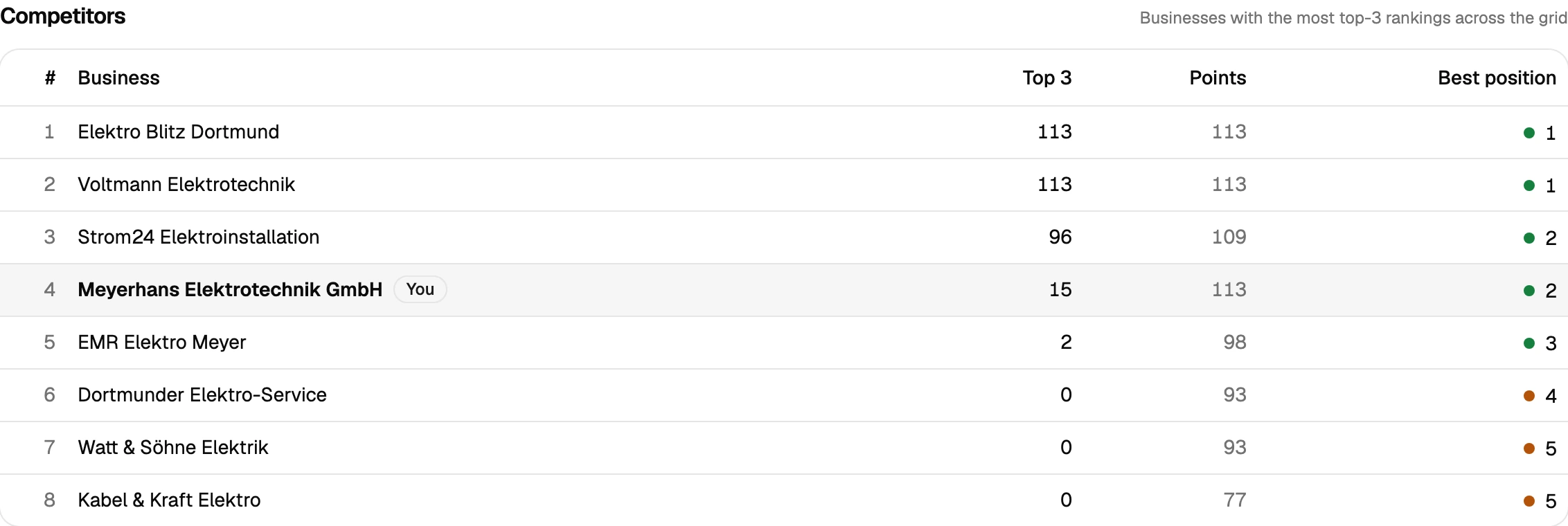
Built around what you actually do all day.
- 01
One project per location, matched by CID, not name
Every location is matched to its exact Google CID/Place-ID instead of its business name — so two branches that legitimately share a name (or an old, duplicate listing that was never merged) never get confused with the one you actually mean to track.
- 02
A leaderboard across locations, not just against yourself
Once every location is scanned with a grid that fairly matches its own service area, SoLV becomes a straightforward way to rank locations against each other — which one is covering most of its top-3 spots, which one is falling behind — instead of guessing from a single combined number.
- 03
Catching two of your own locations competing with each other
Locations close enough together can split visibility that would otherwise belong to one of them — a search made between two branches can surface either. That's only visible when each location's heatmap is looked at on its own, never in a blended average.
- 04
Scaling past a handful of locations without hitting a wall
Pro and Agency plans lift the project limit to unlimited, so growth past Starter's 5 locations doesn't hit a cap. Search Console import seeds a new location's keywords from its own real search queries instead of manual research every time one opens.
- 05
Proving a fix worked at the right location
Scan comparison lays two scans of the same location side by side and shows the delta per grid point, warning automatically if the two configurations aren't actually comparable — so "location 4 improved" is a read, not a guess.
A typical multi-location workflow with SeoMap
Say a chain runs eight locations and wants to know which ones are actually pulling their weight on Google Maps. Each location gets its own project, matched to its exact Google CID/Place-ID (see CID vs. Place ID) — so the branch in one city is never confused with the same-named one three towns over. A first scan per location, sized to that location’s real service area rather than one default grid applied everywhere, becomes its baseline.
Once every location has a baseline, the useful comparison starts: which location’s SoLV is highest, which is lowest, and whether a stale or duplicate Business Profile is quietly skewing one location’s numbers. That’s a leaderboard a marketing director can act on without being an SEO specialist — see Local SEO for multi-location brands: a deeper look for how to keep it fair across locations of different sizes.
Because credits are only counted per grid point, the cost scales with location count in a way that’s easy to plan: a monthly 7×7 queue re-scan across eight locations is 8 × 49 = 392 credits — comfortably inside Starter’s 3,000 a month. Past Starter’s 5-project cap, Pro’s unlimited projects and 12,000 credits cover the same cadence for dozens of locations. Bulk overnight scans that refresh a whole chain’s heatmaps in one run — import the location list, wake up to every result — are coming soon on the Agency plan.
Search Console import seeds each new location’s keywords from its own top search queries the moment it’s linked, so nobody has to guess which terms matter at a branch that opened last month.
Prepare your measurement
Questions we actually get asked.
Should I track all my locations as one combined average?
No — a single blended number lets a strong flagship location quietly cover for a struggling one. Tracking each location as its own project is the only way to see which one is actually losing visibility instead of averaging the problem away.
How do you keep locations with the same brand name from getting mixed up?
Every project is matched to an exact Google CID/Place-ID rather than a business name, so two locations of the same chain — or a duplicate listing at an old address — are never confused with the one you meant to track.
How many locations can I monitor?
Each location is its own project. Starter includes 5 projects; Pro and Agency plans include unlimited projects, which matters once a brand grows past a handful of addresses.
Can two of my own locations end up competing with each other in the map pack?
It's possible for locations close enough together that a search near the midpoint could surface either one. Comparing each location's own heatmap is how you'd notice — a single combined number never would.
What does scaling this to dozens of locations look like?
Unlimited projects on Pro and Agency so growth doesn't hit a project cap, Search Console import so each new location's keyword list is seeded from real search data, and bulk overnight scans — import a full location list, wake up to a fresh heatmap for each — coming soon on the Agency plan.
Can I pull the data into another tool, or do I need to read every scan myself?
Both are covered. A read-only REST API ships with every plan — self-managed, revocable keys, endpoints for projects, scans and individual grid points — so you can wire results into Zapier, n8n or your own reporting. Every completed scan also gets a short AI-generated analysis paragraph automatically, on top of the existing rule-based breakdown, so you're not staring at a raw grid trying to figure out what changed.
Lay the map over your service area.
The first scan takes under three minutes. After that you’ll see your visibility the way your customers do.