Win the pitch. Prove the work.
Your clients don't want a spreadsheet of rankings — they want to see where they're winning and losing. SeoMap turns a Google Maps scan into a colour-coded heatmap you can drop straight into a pitch deck, a client report, or a cold email — no design work, and no login required for whoever's looking at it.
Built around what you actually do all day.
- 01
Cold outreach & pitch meetings
A red heatmap next to a prospect's business address makes the pitch for you — before you've said a word. Share the report as a public link (no login, no exposed client data) and drop it straight into an outreach email or the first slide of a sales deck.
- 02
Client reporting, without building slides
One click turns a scan into a print-ready report — heatmap, ARP/ATRP/SoLV and the competitor table in one document. No more screenshotting the map and pasting numbers into a template by hand every reporting cycle.
- 03
Proving the work actually moved rankings
Scan comparison lays two scans side by side and shows the delta per grid point — improved, dropped, new, lost — and warns automatically if the two configs aren't actually comparable. That's your before/after proof, not a claim.
- 04
Running many clients without mixing them up
Each project is matched to a business by its Google CID/Place-ID, not by name — so a client isn't confused with the two other businesses sharing the same name. The Agency plan adds unlimited projects and bulk scans: import a client list as CSV, start it overnight, and every heatmap is waiting the next morning.
- 05
Positioning against the competitor down the street
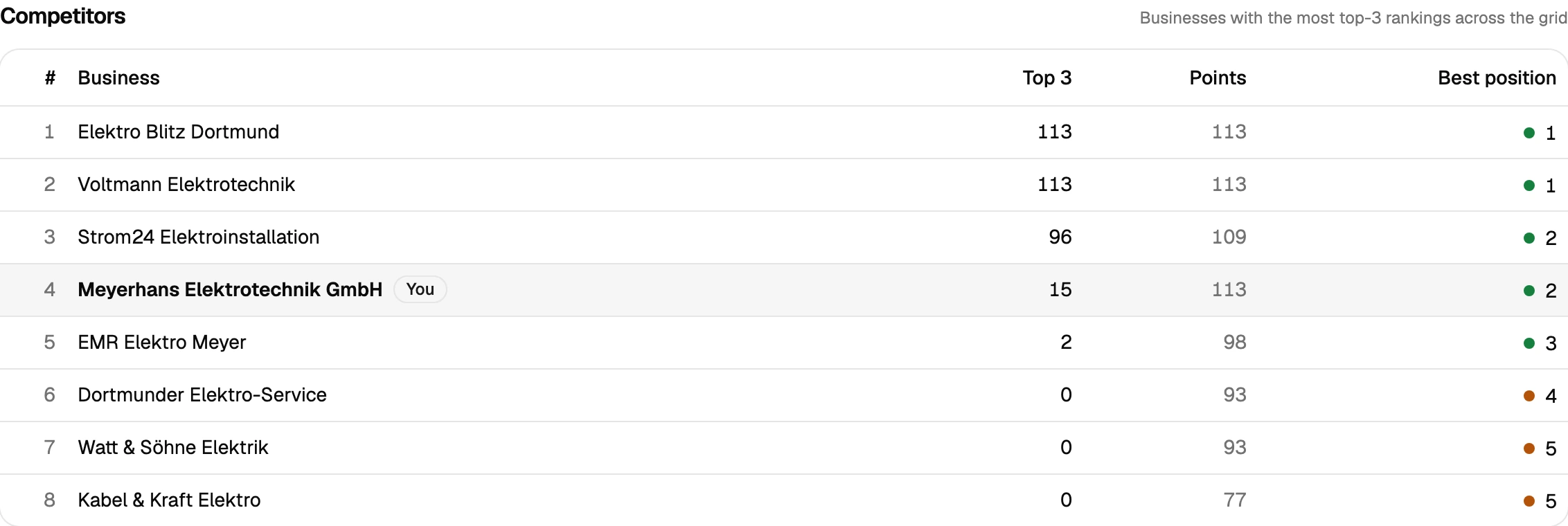
Competitor analysis ranks every business that shows up across the grid by how often it lands in the top 3 — including your client. It's the answer to "who am I actually losing to", ready to paste into a strategy deck.
A typical agency workflow with SeoMap
Say a prospect gets in touch about their Google Maps visibility. Before the call, you link their listing by CID/Place-ID (or import it straight from their Google Search Console, which pre-fills the top search queries of the last 90 days as keywords) and run a 7×7 scan on their main term. Fifteen minutes later you have ARP, ATRP and SoLV, plus a heatmap that shows exactly which neighbourhoods they’ve already lost — the opener for the call.
If they sign, that first scan becomes the baseline. Three months in, you run the same grid again and pull up the scan comparison: which points improved, which dropped, which competitor moved into the gap. That comparison — not a promise — is what goes into the renewal conversation.
Because SeoMap only counts credits per grid point (1 for queue scans, 3 for live), the cost of running this for ten or twenty clients stays predictable: a rolling 7×7 check-in for ten clients is 490 credits a month on queue mode, well inside the Pro plan’s 12,000. When it’s time to run the whole client list overnight instead of one at a time, that’s what the Agency plan is for.
Every report, for every client, can go out as a public share link — so the version that lands in a client’s inbox is the one you looked at yourself, not a screenshot someone had to make first.
Prepare your measurement
Questions we actually get asked.
Can clients see the heatmap without logging in?
Yes — every scan can be published as a public share link. Anyone with the link sees the heatmap and metrics; they don't see your account, your other clients, or any billing data.
How many client projects can I run?
Starter includes 5 projects, Pro and Agency are unlimited. Projects are how SeoMap separates clients internally, so there's no cross-client mixing regardless of plan.
Can I scan a whole client list overnight?
That's the Agency plan: import a CSV of businesses, schedule a bulk run at night, and every heatmap is ready in the morning — no one has to babysit dozens of individual scans.
How many credits does a typical client need?
A compact 7×7 scan is 49 credits (queue) or 147 (live); a full 13×13 scan is 169 or 507. Pro's 12,000 credits a month covers roughly 70 large scans — plenty for a rolling reporting cadence across several clients.
Is there a trial before I commit a client's budget to it?
Yes — 500 free credits on signup, no credit card. Enough to run a couple of real scans on a prospect before you pitch them.
Can I pull the data into another tool, or do I need to read every scan myself?
Both are covered. A read-only REST API ships with every plan — self-managed, revocable keys, endpoints for projects, scans and individual grid points — so you can wire results into Zapier, n8n or your own reporting. Every completed scan also gets a short AI-generated analysis paragraph automatically, on top of the existing rule-based breakdown, so you're not staring at a raw grid trying to figure out what changed.
Lay the map over your service area.
The first scan takes under three minutes. After that you’ll see your visibility the way your customers do.