A hundred agents can share your brand name. Only your own listing should show up in your neighbourhood.
"Insurance agent near me" and "financial advisor near me" are trust searches — people want someone close enough to sit down with, and Google recalculates who that is at every coordinate. When your brand runs dozens of near-identical agent listings across the same metro, a single "we rank well" check tells you nothing about which of those listings actually wins your own territory. SeoMap simulates the search across every neighbourhood you serve and matches listings by Google CID/Place-ID, not by name, so you see exactly where your own profile shows up — and where a same-named colleague across town is quietly winning it instead.
Built around what you actually do all day.
- 01
One scan per search a client actually types
"Insurance agent near me", "car insurance quote [city]", "financial advisor near me" and "retirement planning [city]" can each surface a different set of agents at the same coordinate. Run a separate scan per term instead of assuming one ranking check speaks for every kind of enquiry.
- 02
A grid sized to the radius people actually trust with their finances
A configurable 7×7 to 13×13 grid lets you match the spacing to how far people are willing to travel for a decision this personal — tighter for a dense urban district, wider for a suburban territory covering several zip codes. One scan shows which pockets you already own and which ones a competing office has locked down.
- 03
Same-brand agents kept apart, even when the listing names are identical
Large captive agent networks routinely produce dozens of near-identical business names across one metro. Every SeoMap project is matched by Google CID/Place-ID rather than name, so your own listing is never confused with another agent carrying the same brand a few kilometres away.
- 04
Competitor analysis shows who actually owns each neighbourhood
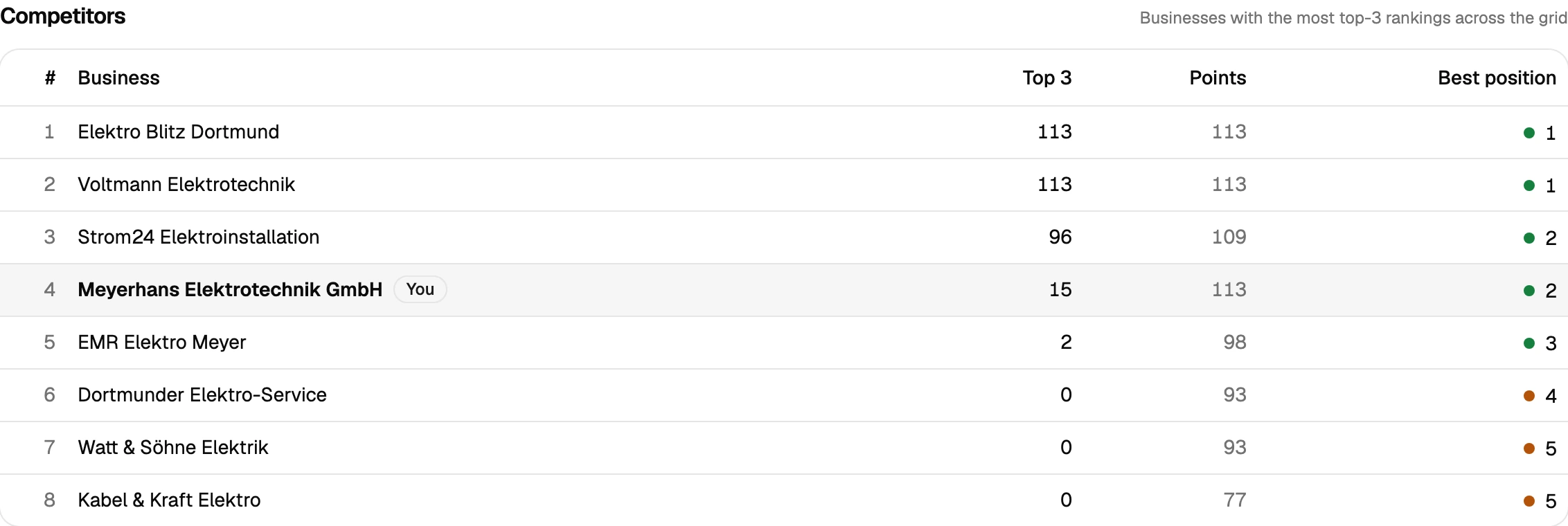
Ranking every business by number of top-3 placements across the grid shows whether it's independent agents or a large captive network winning a given pocket of the metro — the difference that decides whether you're competing against one office or an entire brand's local footprint.
- 05
Evidence a compliance-conscious advisor can actually use
After a review campaign, a Google Business Profile update or a new office, scan comparison lays the old and new grid side by side and shows the delta per point — improved, dropped, new, lost. For a category built on trust, that's a harder thing to fake than a testimonial.
What an insurance agent’s or financial advisor’s grid actually shows
Insurance and financial-advisory search is a trust search, and trust has a radius. Someone typing “insurance agent near me” or “financial advisor near me” is implicitly asking who’s close enough to sit down with — and Google recalculates the answer at every coordinate, which means a ranking check run once from your own office says nothing about the pocket of the metro three neighbourhoods over. That gets more complicated the moment your brand runs dozens of agents under a near-identical business name across the same city: a “we rank well” impression can easily belong to a colleague’s listing, not your own, unless you’re actually looking at the map point by point.
A grid scan removes the guesswork on both fronts. Set it to the radius clients realistically travel for a decision this personal, run it on the exact terms they type — car insurance, retirement planning, whatever your specific service is — and every listing gets matched by CID/Place-ID instead of name, so your own profile is never confused with the agent two exits down the highway who happens to share your brand. Competitor analysis then shows plainly whether it’s independent agents or the wider captive network winning a given neighbourhood, which is the real question behind “why don’t we get calls from that zip code.”
For anyone running a review campaign, a profile update or opening a new office, scan comparison turns that work into a delta per grid point — improved, dropped, new, lost — which is a documented result rather than a claim, in a category where documented results carry more weight than most marketing copy.
Prepare your measurement
Questions we actually get asked.
Dozens of agents share our brand name across the city — will SeoMap mix us up?
No. Every project is matched by Google CID/Place-ID rather than business name, so your own listing stays cleanly separate from every other same-branded agent nearby, even when the names on the map are near-identical.
Do insurance searches and financial-advisory searches behave the same way in the map pack?
No — "insurance agent near me", "car insurance quote [city]" and "financial advisor near me" can each surface a different set of businesses at the same coordinate. Scan the terms clients actually use for your specific service rather than one generic check.
What grid size fits a suburban advisory practice versus a dense urban office?
It depends on how far clients are realistically willing to travel for a decision this personal. A dense urban district often fits a 7×7 to 9×9 grid with tight spacing; a suburban territory across several zip codes usually needs an 11×11 or 13×13 grid.
Can we prove a review campaign or a new office actually widened our reach?
Yes — scan comparison shows the delta per grid point between two scans (improved, dropped, new, lost), which is concrete evidence rather than an assumption, and works well alongside compliance requirements that ask for documented results.
Is there a way to try this before committing a marketing budget to a new territory?
Yes — 500 free credits on signup, no credit card. Enough to run a real scan across a neighbourhood you're considering before you commit budget to reaching it.
Can I pull the data into another tool, or do I need to read every scan myself?
Both are covered. A read-only REST API ships with every plan — self-managed, revocable keys, endpoints for projects, scans and individual grid points — so you can wire results into Zapier, n8n or your own reporting. Every completed scan also gets a short AI-generated analysis paragraph automatically, on top of the existing rule-based breakdown, so you're not staring at a raw grid trying to figure out what changed.
Lay the map over your service area.
The first scan takes under three minutes. After that you’ll see your visibility the way your customers do.