A membership is won on the commute, not the whole city.
Most people join the gym that's on the way between home and work, or a few stops on the train — not the best-reviewed one across town. SeoMap grids that real commute corridor and colours every point by where the studio actually ranks for the discipline someone searched, so you can see exactly which streets already send members to a competitor instead.
Built around what you actually do all day.
- 01
Grids sized for a commute corridor, not a single postcode
A studio's real catchment usually stretches along the route people already travel between home and work, not a neat circle around the front door. Grid size and shape (square or circular, 5×5 up to 15×15) are fully configurable, so a scan can follow a transit line or main road instead of a radius that ignores how members actually get there.
- 02
"Gym", "yoga" and "personal training" are three different rankings
A studio offering multiple disciplines can rank very differently for each one — "CrossFit" and "Pilates" routinely return different map packs at the exact same coordinate. Run a separate scan per discipline, or import Google Search Console data to pre-fill the actual searches people used in the last 90 days.
- 03
Franchise studios that share an identical name in every city
Chain and franchise brands often use the same studio name in dozens of cities, which makes name-based tracking useless. Each project is matched to its Google listing by CID/Place-ID instead, so one franchise location never gets confused with the identically-named studio three suburbs — or three cities — away.
- 04
Scouting where the next location has room
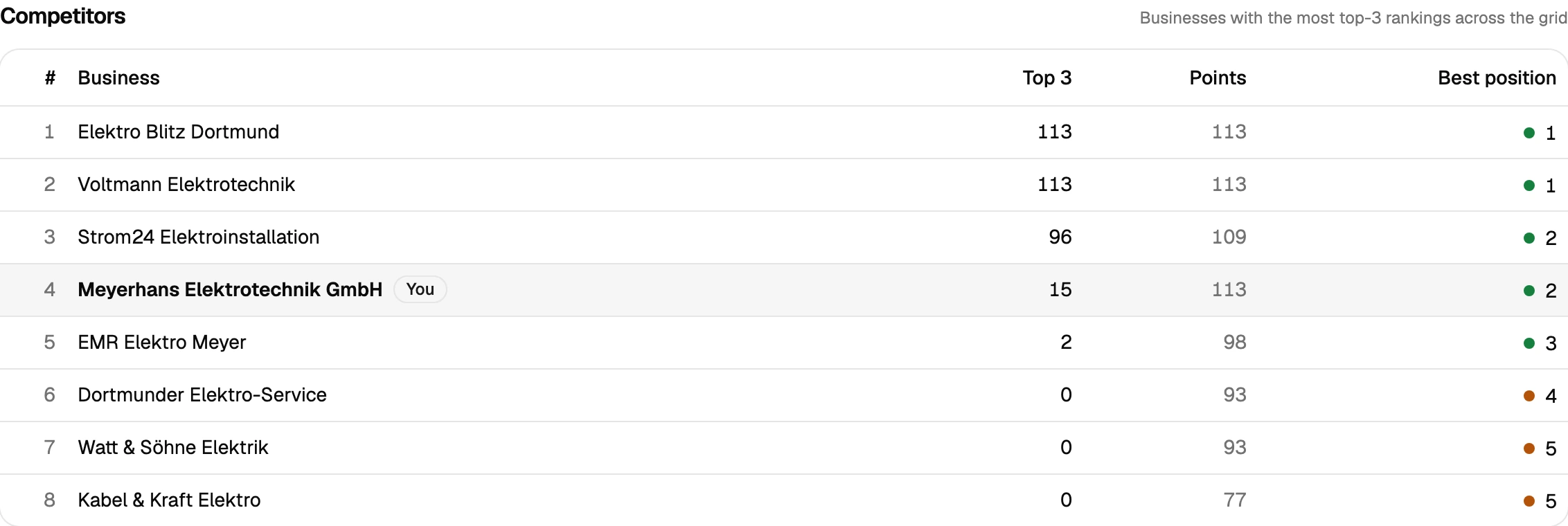
Competitor analysis ranks every studio that shows up across the grid by how often it lands in the top 3. Before signing a lease on a second location, that's a direct read on which parts of the catchment already have a strong incumbent and which ones are still genuinely open.
- 05
Proof before the January rush
The new-year membership surge rewards whoever's already visible when the searches spike. Scan comparison lays a pre-campaign and post-campaign grid side by side with the delta per point — improved, dropped, new, lost — so a Google Business Profile push or new landing page shows up as a map before the busiest sign-up weeks hit.
The gym down the street is the real competitor, not the one with better reviews
A fitness studio’s actual competition is rarely the highest-rated gym in the city — it’s whichever one sits closest to the route someone already travels between home and work. A single “are we ranking” check can’t show that boundary; it just confirms the studio shows up somewhere. A grid scan shows the shape of the catchment instead: green along the commute corridor near the studio, and — often within a surprisingly short distance — red, where a different gym or boutique studio takes the top spots for the exact same search.
That boundary moves by discipline, too. A studio running yoga, CrossFit and personal training under one roof can be strongly visible for one and invisible for another at the identical coordinate, because Google treats each search differently. Running a separate scan per discipline instead of one generic “gym” scan is what actually shows where the marketing effort needs to go — and for a franchise or chain, matching each location by its Google CID/Place-ID rather than its (often identical) brand name is what keeps one studio’s data from blending into the branch three suburbs over.
For a studio owner scouting a second location, or deciding where to spend ad budget before the January membership rush, that same grid — run before and after a Google Business Profile update with scan comparison on the Pro plan — turns “we improved our visibility” into a map with a measurable before and after, not a guess based on foot traffic that’s already walked past.
Prepare your measurement
Questions we actually get asked.
Our members come from along a train line or main road, not a tight radius — does grid scanning still work?
Yes — the grid can be square or circular with fully configurable size (up to 15×15) and spacing, so a scan can follow a real commute corridor instead of a neat circle that ignores how members actually reach the studio.
Can I track different class types or disciplines separately?
Yes, and you should — "CrossFit", "yoga" and "personal training" can each return a different map pack at the same location. Scanning them separately shows which specific search is actually bringing the studio visibility and which one is invisible.
We're a franchise and every location uses the same brand name — will that cause mix-ups?
No. Matching by Google CID/Place-ID instead of business name is exactly what prevents that — your specific studio is linked to its exact listing, not confused with the identically-named location across town.
What grid size makes sense for a fitness studio?
Most studios see a meaningful boundary within a 7×7 to 11×11 grid, wider than a corner shop but tighter than a service business customers drive to. A 7×7 scan (49 credits on queue, 147 on live) is a reasonable first look before widening it.
Is there a trial before I commit budget to this ahead of peak season?
Yes — 500 free credits on signup, no credit card. Enough to run a couple of real scans across the catchment before deciding on a plan.
Can I pull the data into another tool, or do I need to read every scan myself?
Both are covered. A read-only REST API ships with every plan — self-managed, revocable keys, endpoints for projects, scans and individual grid points — so you can wire results into Zapier, n8n or your own reporting. Every completed scan also gets a short AI-generated analysis paragraph automatically, on top of the existing rule-based breakdown, so you're not staring at a raw grid trying to figure out what changed.
Lay the map over your service area.
The first scan takes under three minutes. After that you’ll see your visibility the way your customers do.