Drivers pick from the map pack, not the sign on the road.
Nobody walks past a garage and decides to stop in — they search "car repair near me" or "tyre change" from wherever the car currently is, then drive to whoever shows up first. SeoMap grids the shop's real drive-time catchment, not a walking radius, and colours every point by where the shop actually ranks — so you can see exactly which side of town already drives past you to reach a competitor instead.
Built around what you actually do all day.
- 01
Grids sized for a drive, not a shopfront
Customers reach a garage by car, so the area that matters is a genuine drive-time radius — often several kilometres, wider along a motorway corridor than into a quiet side street. Grid size and point spacing (5×5 up to 15×15) are fully configurable, so the scan matches how customers actually reach the shop instead of a tight radius built for a corner shop.
- 02
Breakdown searches behave differently from routine ones
"Roadside assistance" or "towing near me" can return a completely different map pack from "tyre change" or "MOT inspection" at the same coordinate — Google weighs speed and availability signals harder for urgent searches. Run them as separate scans, or import Google Search Console data to pre-fill the exact service terms customers searched in the last 90 days.
- 03
Chains, franchises and shops that share a name
A regional repair group with several branches, or a franchise brand that looks identical in every city it operates in, is matched project by project via Google CID/Place-ID, not by name — so two branches, or a franchise location and an unrelated independent shop with a similar name, never get confused in the data.
- 04
Seeing who owns the searches near the industrial park or motorway exit
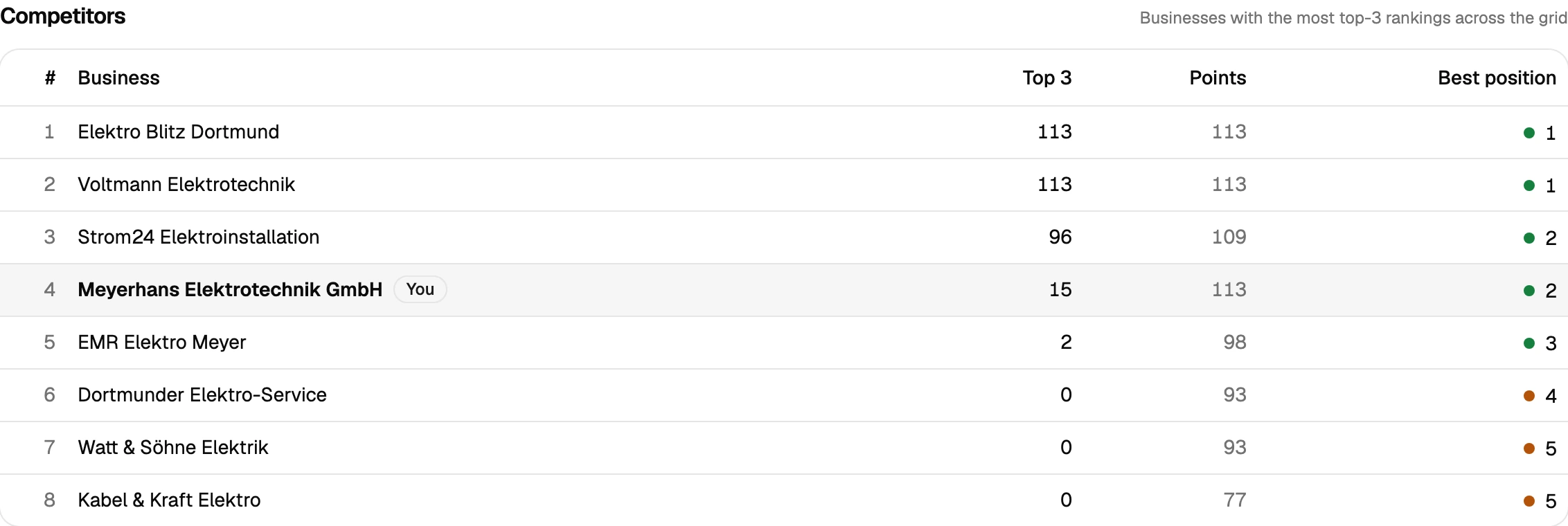
Competitor analysis ranks every shop that shows up across the grid by how often it lands in the top 3. For a garage deciding where to put its next ad budget, that's a direct read on which parts of the catchment a fleet-focused competitor already dominates and where there's still real opening.
- 05
Proof before the next ad budget conversation
After a new landing page for a specific service (tyres, brakes, diagnostics) or a Google Business Profile clean-up, scan comparison lays the old and new grid side by side with the delta per point — improved, dropped, new, lost. That turns a marketing spend decision into a map instead of a guess.
Why a walking radius is the wrong grid for a garage
Most local-search tools default to a radius sized for someone walking past a shopfront — a few hundred metres, maybe a kilometre. That’s close to meaningless for an auto repair shop, because nobody walks in off the street with a flat tyre. Customers search from wherever the car already is — home, work, the motorway shoulder — and drive to whoever shows up first in the map pack. A grid built for a coffee shop will make a garage’s real visibility look better or worse than it is, simply because it’s measuring the wrong area.
SeoMap’s grid is configurable up to 15×15 with adjustable point spacing specifically so it can match a genuine drive-time catchment instead of a walk-in radius. Run it on the shop’s core service keyword and the map shows which parts of town still find the shop and which ones a competitor has already taken over — and because breakdown searches (“towing near me”, “roadside assistance”) often pull a different map pack than the routine version of the same query, running both separately shows whether the shop is actually visible at the moment that converts fastest: right after something breaks.
For a shop weighing where to spend the next round of ad budget, or an agency running this for a repair-shop client, that combination — a drive-sized grid, urgent-vs-routine keyword separation, and a scan comparison after a new service page or Google Business Profile update — turns “we’re doing some local marketing” into a map that’s understood in ten seconds, with the Agency plan covering the volume once there’s more than one shop to run this for.
Prepare your measurement
Questions we actually get asked.
Our customers drive in from well outside the immediate neighbourhood — does grid scanning still make sense?
Yes — grid size and spacing are fully configurable up to a 15×15 grid, so a scan can cover a genuine drive-time catchment along a motorway corridor or across several suburbs, not just the block the workshop sits on.
Can I track breakdown/roadside-assistance searches separately from routine service keywords?
Yes, and it's worth doing — "towing near me" and "car repair near me" routinely return different map packs at the same coordinate. Scanning them separately shows whether the shop is visible in the moment that actually converts: right after something goes wrong.
We're part of a franchise and other branches use the exact same name — will that cause mix-ups?
No. Each project is matched to a business by its Google CID/Place-ID rather than its name, so your specific branch stays separate from every other branch carrying the same franchise brand, and from unrelated shops with a similar name nearby.
What grid size makes sense for a repair shop?
Most shops see their real boundary within a 7×7 to 11×11 grid at a wider point spacing than a walk-in business would use, since customers are arriving by car. Start with a 7×7 scan (49 credits on queue, 147 on live) and widen it if the map hasn't gone red yet.
Is there a trial before I commit a marketing budget to this?
Yes — 500 free credits on signup, no credit card. Enough to run a couple of real scans across the shop's actual catchment before deciding on a plan.
Can I pull the data into another tool, or do I need to read every scan myself?
Both are covered. A read-only REST API ships with every plan — self-managed, revocable keys, endpoints for projects, scans and individual grid points — so you can wire results into Zapier, n8n or your own reporting. Every completed scan also gets a short AI-generated analysis paragraph automatically, on top of the existing rule-based breakdown, so you're not staring at a raw grid trying to figure out what changed.
Lay the map over your service area.
The first scan takes under three minutes. After that you’ll see your visibility the way your customers do.